


Post Single
Posted by:
Comments:
Post Date:
Introduction
Modern site audits involve much more than completing checklists and recording observations. Auditors, managers, supervisors, and maintenance teams often work together across multiple locations to identify issues, verify compliance, assign corrective actions, and track progress. As facility audit programs become larger and more complex, effective collaboration becomes an important part of achieving reliable results.
Many organizations still depend on emails, spreadsheets, printed reports, and separate communication channels to manage this work. This can make it difficult to know which document is current, delay corrective actions, and create gaps in communication. When several people update different versions of the same report, maintaining accurate records and accountability becomes even more challenging.
A centralized site audit management platform brings communication, documentation, and workflows together in one place. With better version control and shared access to current information, teams can work more efficiently, reduce confusion, and maintain a clearer view of the entire audit process.
Key Takeaways
- Centralized communication keeps auditors, managers, and field teams aligned.
- Version control ensures teams work with the latest audit records.
- Digital evidence, tasks, and work orders help move findings toward resolution.
- Dashboards and reports provide visibility into audit progress across sites.
- Standardized workflows improve accountability and consistency.
Why Collaboration Is Essential in Modern Auditing
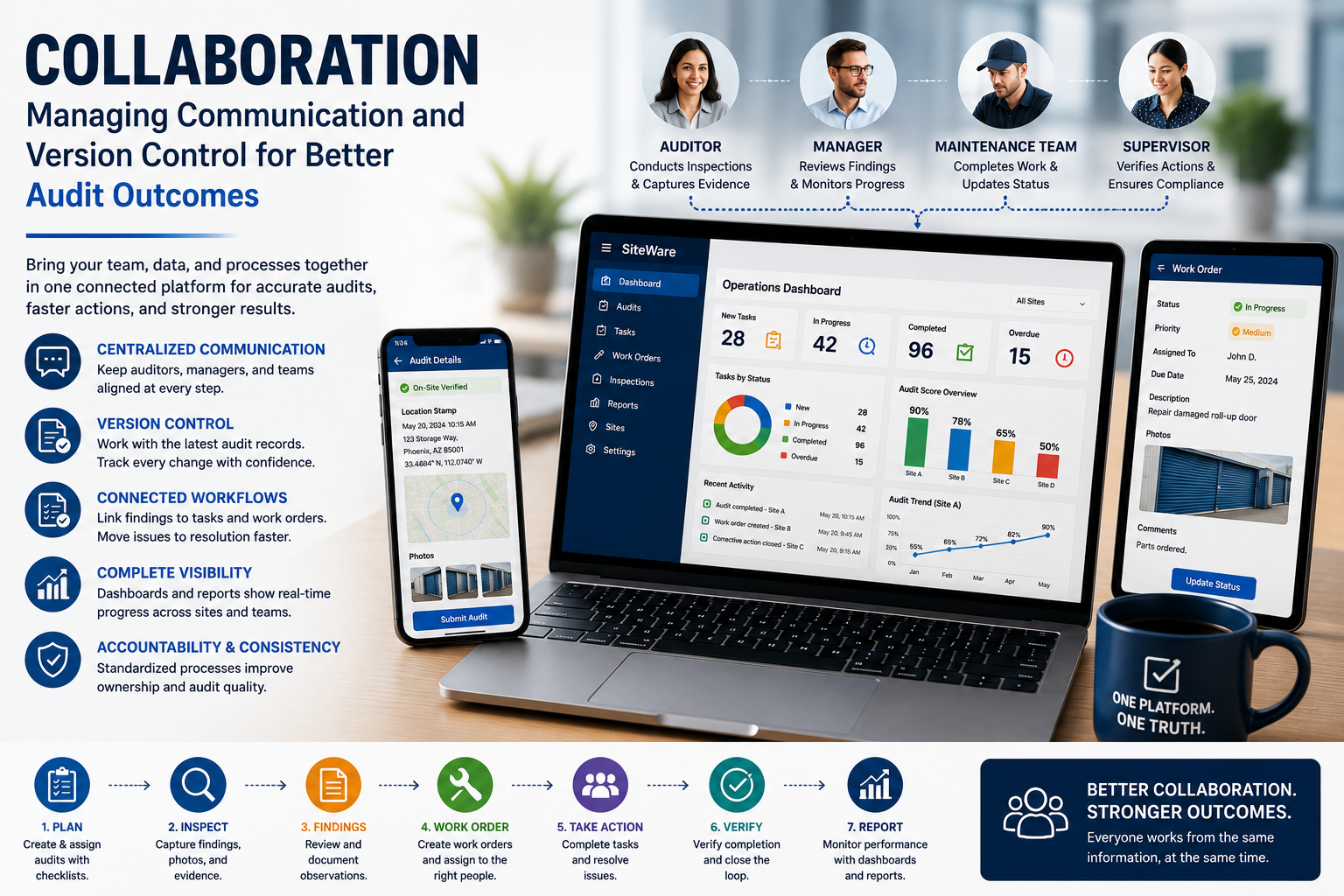
Site audits are rarely handled by one person from beginning to end. A facility auditor may conduct an inspection, a manager may review the findings, a maintenance technician may resolve an issue, and a supervisor may verify that the corrective action was completed.
Without a shared workflow, these activities can quickly become fragmented. Team members may rely on separate email conversations or manually updated spreadsheets, making it harder to understand the current status of a facility audit.
A centralized platform gives everyone access to the same information and makes responsibilities clearer. This reduces communication gaps while helping teams respond to findings more efficiently.
Keeping One Reliable Version of the Site Audit
Maintaining an accurate version of a site audit record is a common challenge when multiple people are involved. Files stored in different locations can lead to duplicate documents, conflicting changes, and uncertainty about which version should be used.
Version control helps address this problem by keeping updates within a controlled audit history. Changes to checklists, comments, evidence, and other records remain connected to the audit, giving teams a clearer record of what was changed and when.
This creates greater transparency and provides useful documentation for future reviews, regulatory inspections, and internal governance.
Improving Communication Throughout the Audit Lifecycle
Good collaboration should continue after the inspection is complete. The facility auditor may record a finding, but someone still needs to act on it.
A connected workflow can take the site audit from assignment and inspection through finding review, evidence collection, work order creation, corrective action, and completion. Each person involved can see where the work stands instead of waiting for a separate update.
This is particularly useful for teams managing several locations. Managers can spend less time asking for status updates and more time dealing with issues that actually need their attention.
Connecting Site Audit Findings to Corrective Actions
A site audit is only useful if its findings lead to action. A problem recorded in a report does not solve itself.
A connected workflow allows auditors to turn findings into work orders or tasks. For example, if an inspection identifies damaged equipment, the auditor can create a work order, assign it to the appropriate technician, and attach photographs showing the issue. Managers can then follow the progress without moving between different systems.
Keeping the finding and the corrective action connected makes it easier to see the complete history of the issue. It also gives managers a better way to determine whether reported problems are actually being addressed.
How SiteWare Supports Site Auditor Collaboration
SiteWare brings facility audits, inspections, tasks, work orders, dashboards, and reports into one platform. This gives teams a shared view of audit activity while supporting collaboration from desktop and mobile devices.
With SiteWare, organizations can conduct digital facility audits using customizable checklists, create tasks and work orders from audit findings, and upload photographs as supporting evidence. Teams can assign corrective actions, monitor progress through dashboards, and review Audit Completion Reports to understand audit status.
Organizations can also use Site Performance Comparison reports to compare operational performance across locations and Site Portfolio Reports to identify broader trends across their facilities.
By connecting these workflows, SiteWare helps teams communicate more effectively while maintaining consistent processes across multiple sites.
Best Practices for Managing Collaborative Site Audits
Organizations can make collaborative site audits easier by starting with a few simple practices. Use the same checklists and site audit templates across locations where possible, keep records in one central system, and make responsibilities clear from the beginning.
Evidence should also stay with the finding it supports. Photographs and documents provide useful context when another team member reviews an issue later. Finally, corrective actions should be tracked through the same workflow rather than being left to manual follow-ups.
Regularly reviewing completed audits can also reveal recurring problems and areas where processes need attention.
Conclusion
Collaboration is an important part of getting lasting value from a site audit program. When site auditors, managers, supervisors, and maintenance teams work from different information, even a well-executed inspection can lead to delays and confusion.
Keeping communication, site audit records, evidence, tasks, and corrective actions connected gives teams a much clearer path from identifying an issue to resolving it. SiteWare supports this approach by bringing these activities together in one platform, giving teams a shared view of their work across multiple facilities.
The goal is not simply to complete more facility audits. It is to make sure the information collected during a site audit reaches the right people, leads to the right action, and remains available when the organization needs it.
